

| Note: I have corrected two errors discovered in the first version of the calculator. A number in a lookup table contained a stray comma, which affected PAG 12. Also, I have deleted PAG 20, which overlapped with PAG 19 and had lower benchmarks. PAG 20 appears to be a remnant of the 2023 average scores table left in the 2026 accountability document. Either you can correct yourself (see below for guidance) or download again via link below and copy the data across. |
The delayed Primary Accountability Technical Guidance has now been published, which has enabled me to update the VA calculator tool with the new prior attainment groups and associated benchmark estimates. As discussed in last week’s post, there are issues with the guidance – the annexes, which contain many important aspects of the methodology – still point to 2023. For example, the standard deviations used to calculate the confidence intervals have not been updated. And the extreme outlier lookup table, which limits the impact of very low pupil progress scores is also unchanged. This means that the VA calculator will need a further update when amended guidance is released.
See below for link to download.
The tool works in the usual way: enter the KS1 prior attainment and the KS2 results in the columns provided, and the spreadsheet will do the following:
- place pupils into low/middle/high prior attainment bands (unlike the checking data these should be correct)
- Sift pupils into one of 19 prior attainment groups (PAGs) – note: technical guidance shows 20 groups but PAG 20 appears to be an error, a remnant of the 2023 guidance.
- Calculate the KS2 benchmarks for each pupil for each subject
- Compare the actual to the benchmark to calculate the individual progress scores
- Aggregate the pupil progress to generate the school progress scores on the school VA tab
- Apply the confidence interval to establish whether the result is significantly above or below average (note: as explained above, this currently uses the 2023 standard deviation so treat with caution)
You can then use the tool to explore the impact of individual pupils on overall progress scores, and remove pupils to get a recalculated figure. To remove a pupil, simply delete their KS1 results. You don’t need to delete the entire row.
Please read the notes tab for further instructions. If you need to unlock the spreadsheet for any reason, the password is primary.
Insight users
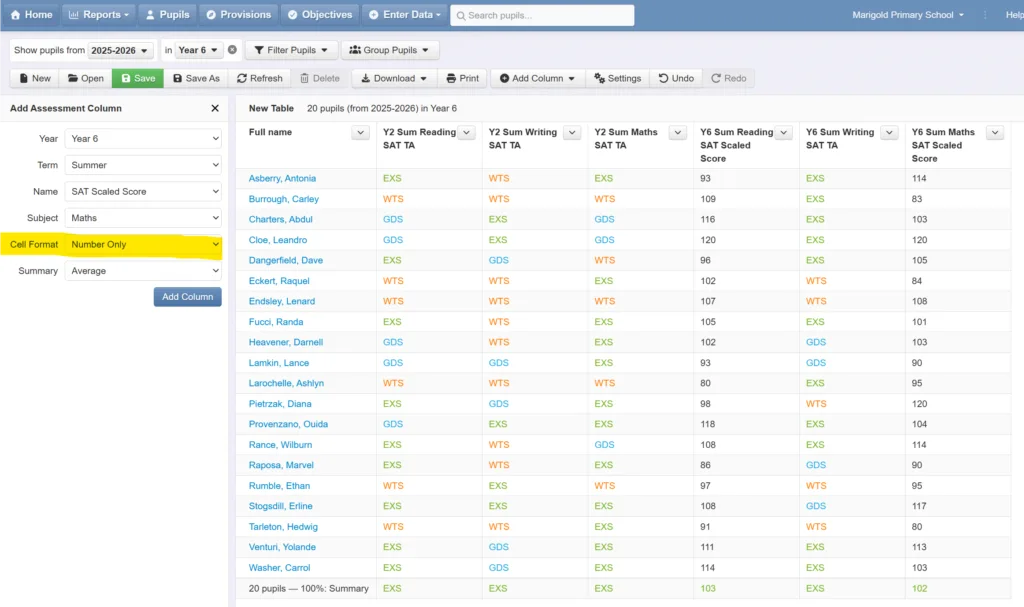
If your school uses Insight, you can populate this tool by exporting a table of your 2025/26 year 6’s KS1 and KS2 results, which you can then paste into the spreadsheet. Go to Reports > Tables, select the relevant year 6 in the year filter at the top of the screen, and add assessments columns with selections shown in screenshot below. Repeat for reading, writing and maths. Note: when adding columns of scaled scores for reading and maths, choose the Cell Format > Number Only option (highlighted below). This will ensure the data is transferred as a number rather than text. You will need to manually add any KS2 reading and maths pre-key stage assessments manually to the spreadsheet.
Then click download, export to excel and copy and paste the data into the columns provided for pupil names, KS1 and KS2 results. Note: use Paste Special > Values (Ctrl + Alt + V) rather than standard paste to preserve formatting. Also, beware hidden columns – pasting into these will overwrite the formulae.
How to correct errors in the VA calculator
As explained above, two errors have been identified in the first version of the VA calculator, which have now been corrected. The easiest solution is to re-download (via button above) and copy and paste the KS1 and KS2 results into the latest version. But if you’d like to amend your current version, please do as follows:
- unlock the points lookup tab (right click on tab and enter password ‘primary‘.
- In column C locate value 5,.19 and change to 5.19 (i.e. delete the stray comma). This will fix the PAG 12 issue.
- Delete the PAG 20 data, which appears to be a remnant of the 2023 methodology. To do this, just highlight the data in the PAG 20 row of lookup table (row 22, columns C-H) and delete.
- Change the range of PAG 19 from ‘>= 9.75 to < 10.00’ to ‘>= 9.75 to < 10.01’. This will ensure that pupils with KS1 APS of 10 (i.e. GDS in all subjects at KS1) are included in PAG 19.
- Remember to click save. These changes should fix the issues.
Are you interested in exploring the current state of data in schools and finding out what works and what doesn’t? Join us at one of our 2026-27 Data in School Conferences


Leave a Reply